
CASE STUDIES
See How Practical AI & Automation Improve Everyday Work.
Explore real workflows, AI-assisted systems, and connected processes built to reduce manual work, improve follow-through, and keep important information moving.
FEATURED CASE STUDY
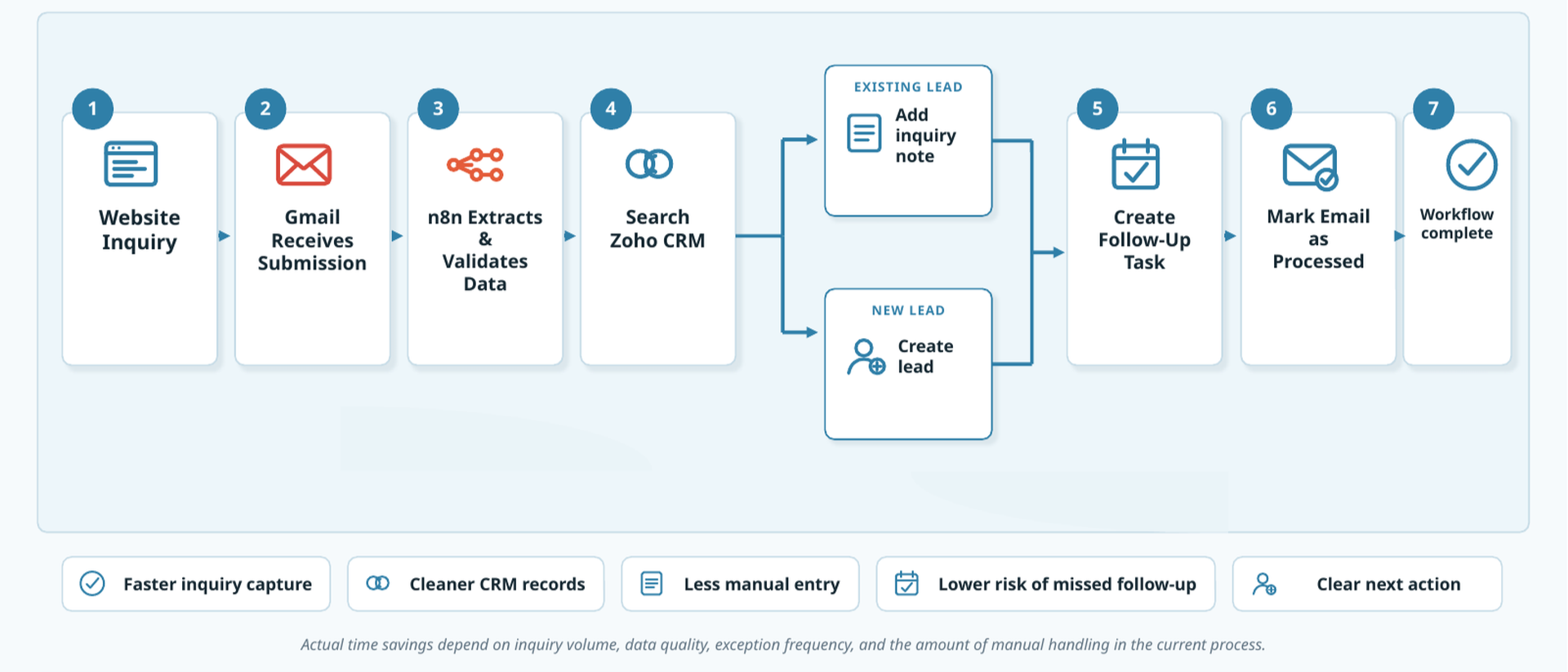
Automated Lead Intake and Follow-Up
A connected workflow that turns a new website inquiry into an organized CRM record, a clear follow-up task, and a visible next step—without relying on repetitive manual entry.
The Challenge
New inquiries arrived through the website and email, but processing them required several manual, time-consuming steps. Contact details had to be reviewed, entered into the CRM, checked for duplicates, and converted into a follow-up task.
That created avoidable administrative work and made consistent follow-through dependent on someone completing every step correctly.
The Solution
Rollstone built a connected workflow that detects each inquiry, organizes the submitted information, and checks the CRM for an existing record.
It then creates or updates the appropriate lead, generates a follow-up task, marks the original message as processed, and routes failures for review.

MORE CASE STUDIES
More Ways Practical AI & Automation Improve Operations.
From keeping systems aligned to coordinating recurring work and supporting teams with AI, these examples show how different operational problems can be improved with the right combination of process, technology, and human oversight.
AI-Assisted Workflow
Turn Incoming Information Into Action
An AI-assisted workflow that reviews incoming information, identifies relevant context, organizes the request, and prepares the appropriate next step for human review.
Information received → Review and classify → Find relevant context → Prepare recommended action → Human review
- Less time spent sorting information
- Faster preparation and response
- Human control over final decisions
Workflow Automation
Coordinate Client Onboarding
A structured onboarding workflow that turns a new engagement into an organized series of tasks, folders, communications, status updates, and internal handoffs.
Client approved → Create workspace → Prepare tasks → Organize documents → Initiate communication → Track completion
- More consistent onboarding
- Less repetitive setup work
- Better visibility into incomplete steps
Connected Systems
Keep Contact Information Aligned
A connected workflow that synchronizes selected CRM records with Google Contacts, reducing repeated updates and helping frequently used contact information stay current.
CRM record updated → Validate information → Find matching contact → Create or update contact → Log the result
- Less duplicate data entry
- More consistent contact information
- Exceptions routed for review
